Campaigns
Last updated: June 16, 2026
In-depth guide covering all there is about N.Rich campaigns and the advertisements within them
Campaigns are vessels containing groups of advertisements intended on nurturing your account segments on the various stages of their buyer journey.
How many campaigns you can create depends on the plan you are on - ranging from 1 on the Lite plan, 10 on Growth and unlimited on the Custom plan.
Campaigns can be limited to specific geographies or run globally, they can include or exclude any number of segments you have defined. You can run campaigns indefinitely or for a specific amount of time. Every campaign has a dedicated monthly budget, allowing you to control the spend of each campaign independently.
Campaigns can be in three states - Draft, Live and Stopped.
In order to begin creating campaigns, navigate to the campaigns view:
Once there, you will see a view like this:
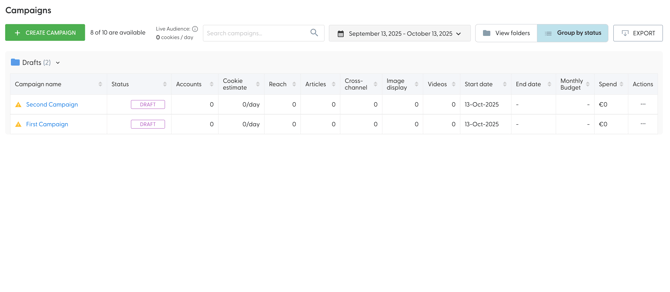
For a detailed overview see All Campaigns View and how to best leverage it.
When it comes to creating campaigns, it is quite straight forward and we will slightly expand on what was covered in the Getting started guide. Provided you have enough campaign slots, the + Create campaign button will trigger a side panel offering two choices:
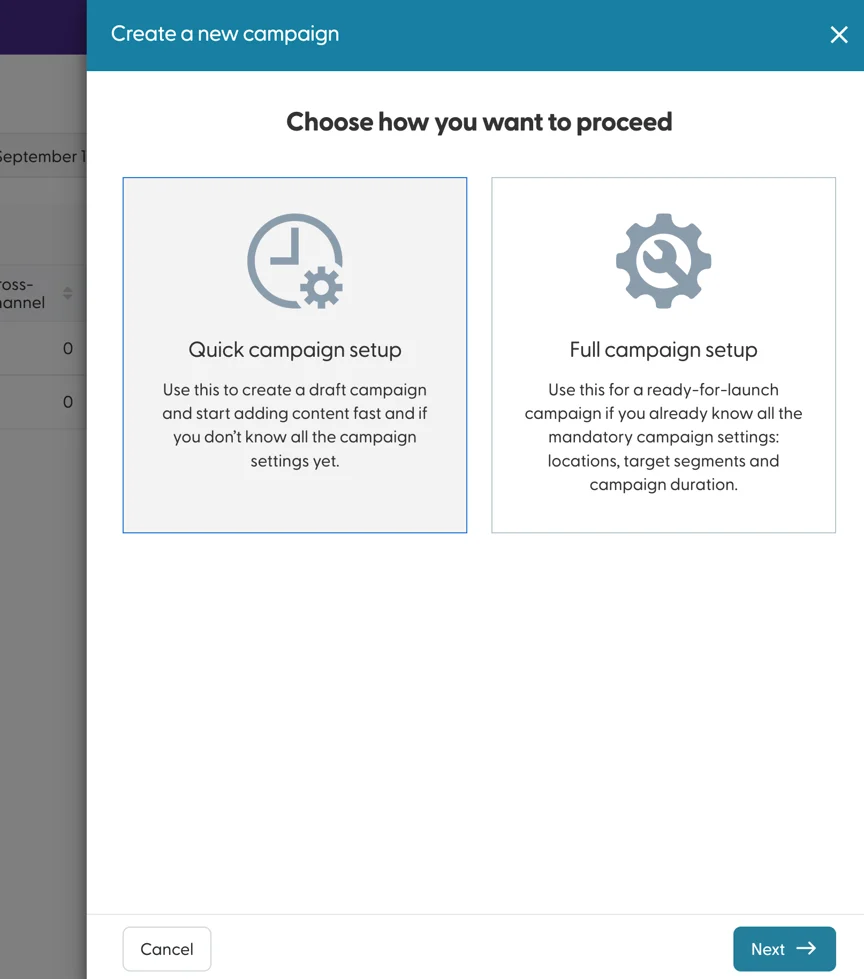
The Quick campaign setup will only ask for a name of your future campaign before you can begin loading your ad assets, while the Full campaign setup will ask for a few details before your campaign is created. Before launching the campaign, you will need to provide the following details:
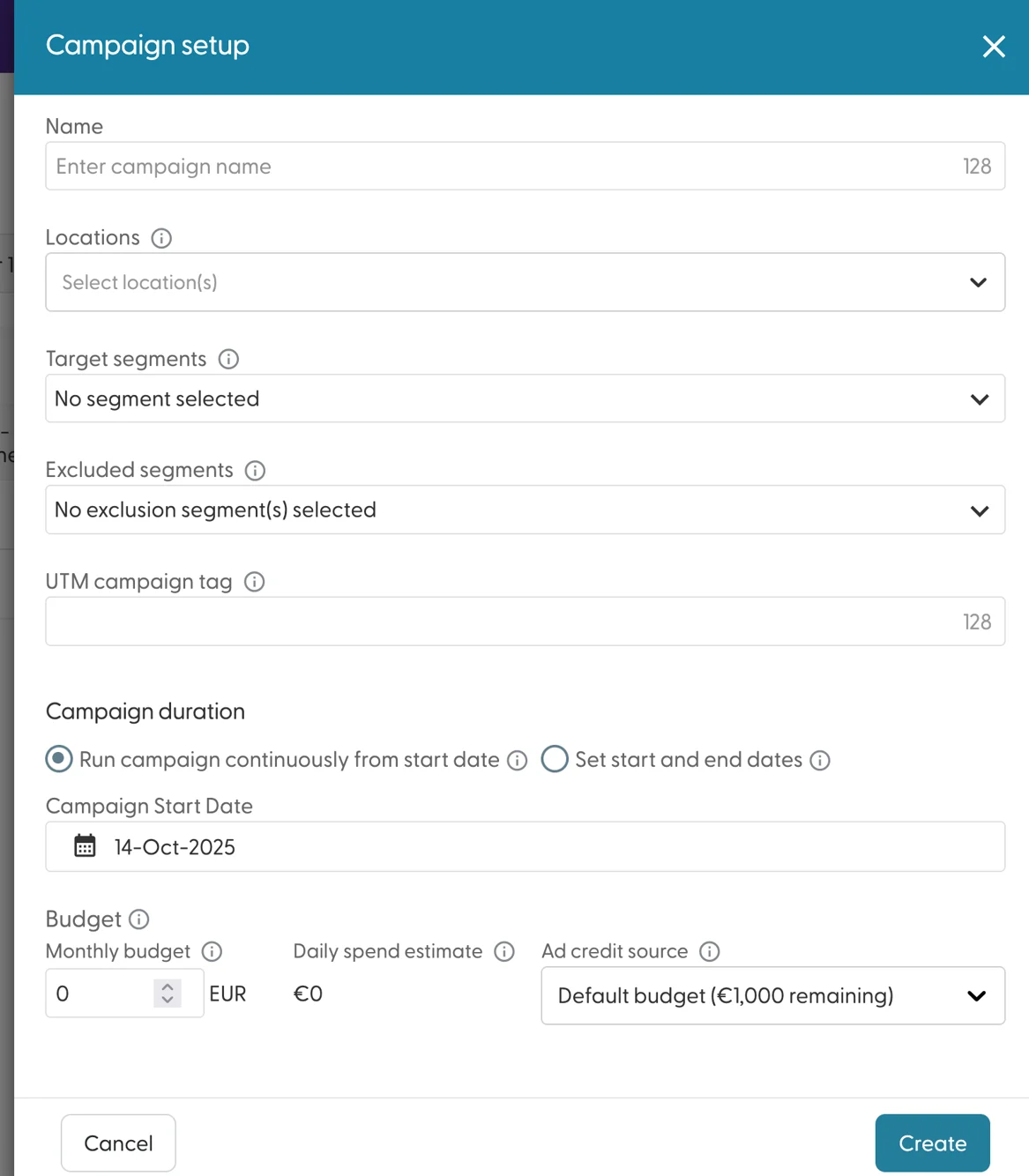
The campaign Name should be something both distinguishable and memorable (hence the 128 character limit) This will become the primary identifier of your campaign across all reports and analytics.
Locations define in which countries this ad will run. Keeping this field empty ensures your ads will run in any country the accounts in your segments operate. Limiting this to select countries will limit the reach of your campaign. That said, if you know that your buyer specifically operates in Country A, while their offices in Country B are not your preferred buyer, limiting the campaign to Country A is a reasonable choice.
Target segments and Excluded segments define which accounts should be targeted and excluded from your campaigns. For example, you wish to target accounts in your hot accounts segment, but you do not want to target anyone who is already a customer (and is in your converted accounts segment) - targeting the former and excluding the latter makes sense. If for any reason a recently converted account is lingering in your hot accounts segment, the exclusion will trump the target and this account will not be targeted. As such, any account that is present in both the target and exclusion segment will not be targeted by your campaign.
The UTM Campaign tag is a handy way of identifying your N.Rich campaign performance outside of N.Rich analytics - most of our users tend to reuse the campaign names (as it also has a 128 character limit) - we generally recommend not to use spaces, and to instead leverage +'s - these convert into spaces within Google Analytics. N.Rich will automatically assign utm_source and utm_medium tags and these cannot be changed or overridden. Learn more about these UTM tags here.
The Campaign duration defines when a campaign starts and for how long should it run. It is possible to define only a start date for your campaign and have it run indefinitely, or define a clear start and end date. Your campaign spend will not be influenced by the duration of your campaigns. If you are planning for campaigns shorter than a month, make sure to take this fact into account.
The Monthly budget defines how much funds your campaign is allowed to spend in any given month. This amount is broken down into an average daily spend estimate by dividing the monthly budget by 30.4(which is the average number of days in a month, on a yearly basis) As a rule of thumb, your campaign will not spend more on a daily basis than this amount. In practice, this may vary, as N.Rich will optimise your campaign spend for days of the month when more traffic is to be expected. For example, since there is naturally less traffic on weekends, the daily spend on weekends can be significantly lower, which will then result in a higher spend on weekdays, when there is more traffic and engagements are much more likely.
Finally, the ad credit budget source can be modified in case you are leveraging multiple ad credit pots (further described here).
In case you are missing info on any of the points above, but you want to begin working on your campaign ad assets, choose Quick campaign setup, give your campaign a name and you can start working. In case your campaign details are known, Full campaign setup is the way to go.
Upon creating a campaign a prompt will ask you whether you want to jump straight into creating your ad assets or remain on the All campaigns view:
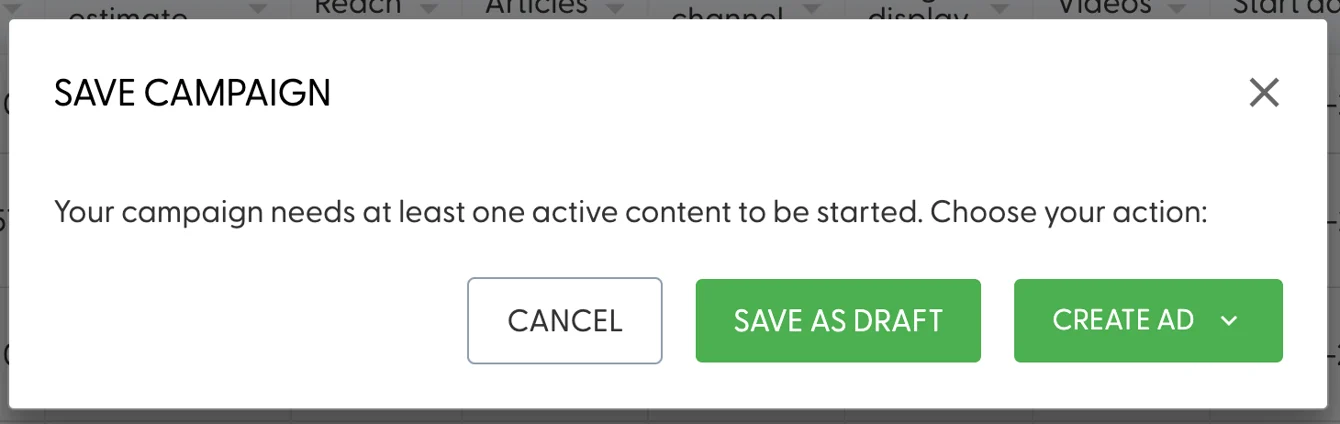
Cancel and Save as draft will return you to the All campaigns view.
Create ad gives you the option to jump straight into creating one of the four available ad types.
While on the All campaigns view, clicking on the name of a campaign will lead you into the Single campaign view.