Campaign Learning: initial learning and re-learning explained
Last updated: October 1, 2026
Seeing a Learning badge on your campaign? This article explains what it means, which changes cause it, and whether your ads keep delivering while it's there.
In short: new campaigns go through initial learning and deliver little until it ends. Live campaigns go through re-learning after a change and keep delivering.
What "Learning" means
When a campaign goes live, or when a live campaign is changed in a significant way, Google needs time to work out how to deliver it well. In N.Rich, we call this the Learning stage.
There are two types of Learning, and they behave very differently:
Initial learning: the campaign is new, and Google builds delivery from scratch.
Re-learning: the campaign was already live and delivering, and Google adjusts to a change you made. It builds on top of what it has already learned, so your ads keep delivering.
Quick rule: if your campaign was already live and delivering before the change, it's in re-learning and keeps delivering. The one exception is narrowing the campaign's locations (see the table below).
Where the Learning badge appears
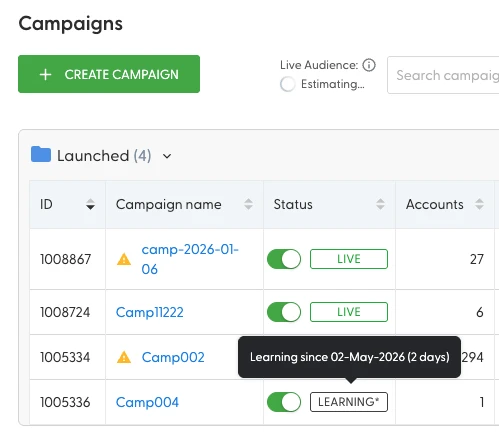
Scope: Learning is shown at the campaign level and only for campaigns with display ads (Cross-channel and Image display ad types). It doesn't apply to Article or Video ads, which run on the N.Rich DSP.
Note: the badge doesn't show up right away. It can take up to 4-8 hours for our system to sync the Learning status from Google-side.
Which changes trigger Learning, and what happens to delivery
Change | Type | Delivery |
|---|---|---|
New campaign going live (Draft or Stopped to Live) | Initial learning | Few or no impressions until learning ends |
Reactivating a campaign that was paused for more than 7 days | Initial learning (Google treats this as a reset) | Few or no impressions until learning ends |
Budget change of more than ~20% of the current monthly budget | Re-learning | Continues |
Adding or removing a segment | Re-learning | Continues |
Widening locations (removing a location limitation) | Re-learning | Continues |
Narrowing locations (adding a location limitation) | Learning | Stops until learning ends |
Changes that don't trigger Learning: creating or editing ads, adding an ad to a campaign that's already in Learning, and renaming a campaign. Any new or edited ad still needs a fresh Google approval.
How changes affect performance
During re-learning your ads keep delivering, but performance shifts depending on what you changed:
Change | Effect on performance |
|---|---|
Increase budget | Performance goes up |
Reduce budget | Performance goes down |
Add accounts or segments on the same budget | Performance per account goes down, since the same budget is spread across more accounts |
Remove accounts or segments on the same budget | Performance per account goes up, since the budget is concentrated on fewer accounts |
What to expect
During initial learning
Delivery: expect few or no impressions until learning ends. Google has no data on the campaign yet, so it's building delivery from scratch.
Spend: the campaign may spend less than expected. Spend evens out once learning ends.
Results: don't use results from this period to decide whether the campaign is working. Wait until learning ends.
During re-learning
Delivery: ads keep delivering. If anything, delivery should improve as Google adjusts to the change.
Results: performance follows the change you made (see the table above), not the re-learning itself.
Waiting: you don't need to wait for re-learning to end before making other planned changes.
"This change may restart the learning phase" pop-up
When you edit a Live campaign and click Apply changes, this pop-up appears:
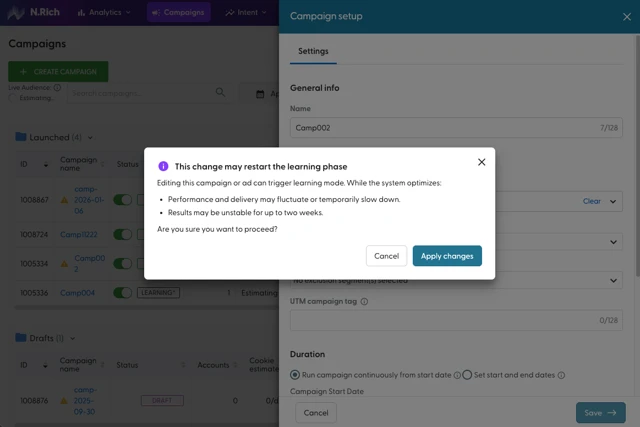
What it means: since the campaign is already live, the change will put it into re-learning and your ads keep delivering. If the change narrows the campaign's locations, delivery stops until learning ends.
Cancel: keep the campaign as it is.
Apply changes: save the change.
Tips
Adding accounts? Raise the budget too. Increase the budget in the same change so performance per account doesn't drop. Making both changes at once also means only one re-learning.
Think twice before narrowing locations. Adding a location limitation to a live campaign stops delivery until learning ends.
Avoid long pauses. A campaign paused for more than 7 days goes through initial learning again when you turn it back on.
Give new campaigns time. Avoid major changes to a campaign that's still in initial learning, since each one can extend it.
Troubleshooting
"The campaign isn't delivering, and there's no Learning badge." Check that the campaign is set to Live. The Learning status can take up to 4-8 hours to sync from Google-side, so wait a few hours and check again. If the badge still doesn't appear, note the time, the campaign name and any recent changes, and send them to the solution engineering team in your dedicated Slack channel or at solution.engineering@n.rich.
"The campaign was live, I made a change, and now it isn't delivering." Contact solution engineer support with the campaign name and the change you made.
FAQ
How long does Learning last?
There's no fixed number of days. Initial learning usually takes around 5-10 days, but it depends on the campaign type, traffic and how big the change was. You can't speed it up.
My campaign shows the Learning badge after I added a segment. Are my ads still running?
Yes. A campaign that was already live goes into re-learning, and ads keep delivering while Google adjusts.
Will re-learning make my results worse?
Not by itself. Any change in performance comes from the change you made, for example spreading the same budget across more accounts.
Does renaming a campaign trigger Learning?
No. The name isn't a delivery setting. A rename may change the utm_campaign value in your tracking URLs. If you see the Learning badge appear after a rename, let support know so we can check.
Does Learning mean something is wrong?
No. It's a normal part of how Google delivers campaigns after launch or a significant change.
Where to next
All Campaigns View: find the Learning badge across all your campaigns.
Single Campaign View: check a campaign's status, dates and segments.
Advertising Budget Management: how campaign budgets and auto rollover work.
Segments: build and manage the segments your campaigns target.
Cross-Channel Ads and Image display ads: the ad types that go through Learning.
Still have questions? Reach out to our solution engineering team via the chat in the bottom-left corner of the N.Rich platform.