What does the "There is an issue with tags on this landing page" warning mean?
Last updated: October 7, 2026
When you add a link to an ad, a yellow warning may appear next to it. This article explains what it means, when you can ignore it and when to check your tag.
What the warning means
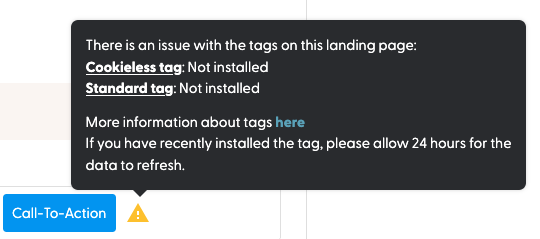
The yellow triangle with a white exclamation mark next to a link means N.Rich hasn't detected any traffic on that URL through the Cookieless or Standard tag in the past 24 hours.
What to do
The page is brand new and hasn't had visitors yet: this is normal. You don't need to do anything.
The page had traffic before: check your Tag configuration to make sure the tag works as expected.
If you're not sure, open the link yourself, browse the page and accept cookies. Within 24 hours the tag should register your visit and the warning should disappear.
If you visited the page and accepted cookies and the warning is still there more than 24 hours later, send the page URL to your Solutions Engineer. They can check whether the tag is installed correctly on that page.
What's next
Need help? Reach out to your Solutions Engineer via the chat in the bottom-left corner of the N.Rich platform, by email or Slack.