Getting Started with Aurora AI
Last updated: March 17, 2026
Learn how to activate and use Aurora AI - N.Rich's ad assistant developed to help you craft winning ABM ads.
Overview
Aurora AI helps to claw back time and create advertising content for your ABM campaigns. Your new ally will help craft winning ads by generating on-brand advertising content that adhere to industry-specific regulatory standards and are most likely to drive account engagements. This is game-changing for marketing teams operating in specialized markets where content creation is challenging and costly. With Aurora AI, you can now:
Create industry, persona or product-specific content at scale
Overcome writer's block and accelerate your ad campaign creation process
Have a quick turnaround and unified messaging for long or short form content
Getting Started
Prerequisites:
You must have a lite, growth or enterprise N.Rich license.
You must have the campaigns module enabled (not available for POCs/Free Trials).
Setup Instructions:
To activate Aurora, you must:
Request the feature’s activation through your Customer Success Manager
Provide the training materials for your brand’s ad assistant
To ensure that the most effective and relevant ad content is generated using Aurora, it's essential to provide comprehensive and detailed materials related to your company, market, brand and products. We have put together this guide to help you.
Feature Demo
Key Features and Functionalities
Once you have Aurora enabled in your N.Rich platform, you will be able to:
Generate AI ad copy for Cross-Channel and Article Ads within the editor
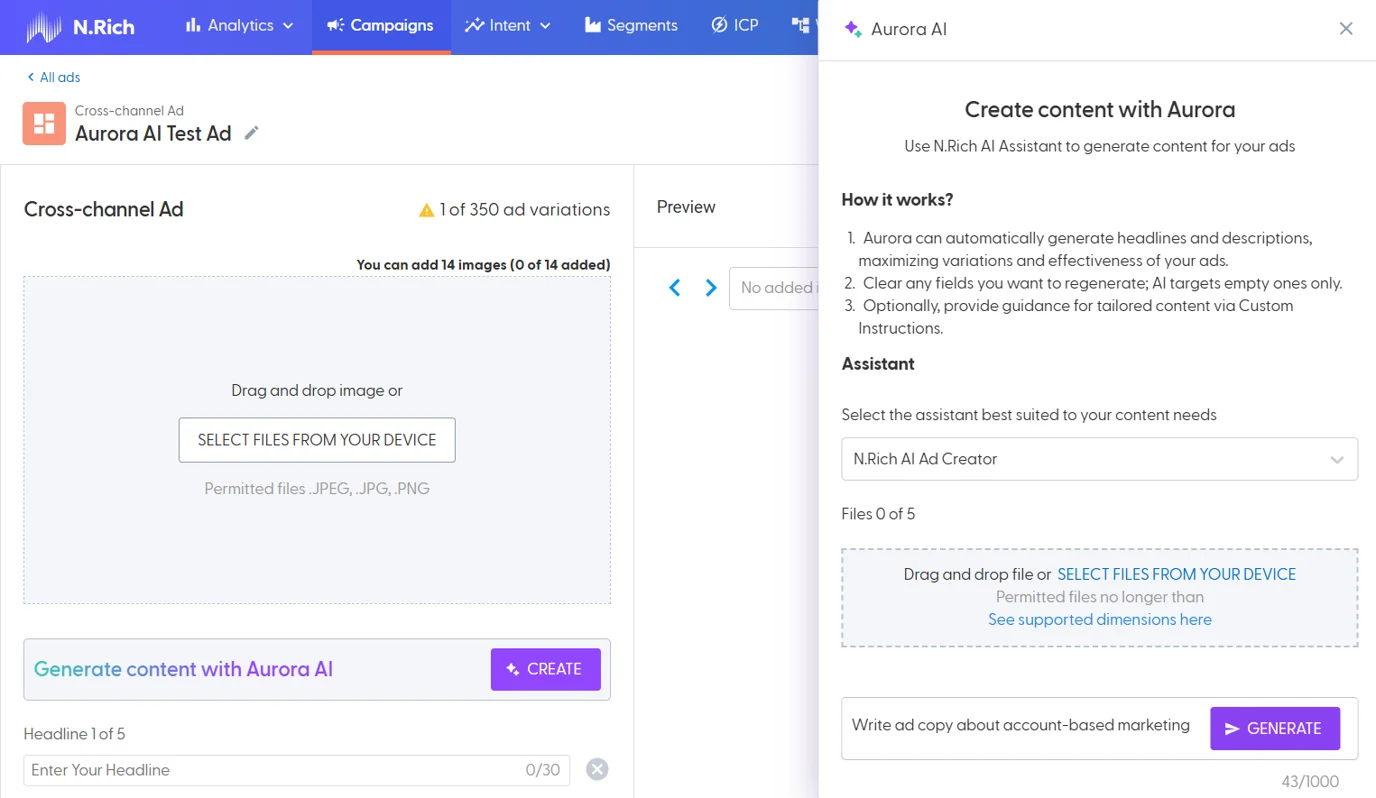
Once you are in a campaign in N.Rich and open the ad editor for either a Cross-Channel ad or Article Ad, you will be able to see the banner for Aurora and the “Create” button which will bring up the Aurora AI window. By clicking on generate, you will request Aurora to populate blank fields in the editor with content based on its knowledge.
Note: For the ad assistant to populate any fields in the ad editor, the fields need to be cleared out first. For example, within the Cross-Channel ad editor, you can clear out all the copy (headline or description fields) that are not a good match and keep the good ones. Aurora will then only re-populate the ones you cleared, helping you iterate to the ideal result.Provide custom instructions (additional prompts) to fine tune your ad copy
You can provide custom instructions to Aurora to create content for different audiences, personas, profiles, and journey stages. Use this to provide more context and instructions to fine tune your results. See the best practices sections for some examples.Provide additional knowledge through the document upload capability
You can leverage specific content like research papers, whitepapers, articles, or case studies to generate content for particular ads/campaigns. This feature empowers users to tailor ad content more effectively by uploading specific files, exclusive to their current session/generation and is not incorporated into Aurora’s generic knowledge base, ensuring privacy and precision. This can help users generate highly relevant ad content directly tied to specific resources, ensuring their campaigns are focused and impactful. You can upload up to 5 documents with the supported file formats (doc, docx, pdf, pptx and txt).
Best Practices
Using Custom Instructions
We strongly recommend you to experiment with providing Aurora with more context and instructions through the custom instructions field, to generate the best results. Here are some examples:
Create ad copy raising awareness around “enter custom problem here”
Create ad copy to promote “enter your specific product here”
Create ad copy targeted to “enter persona/job title”
Create a thought leadership article about “enter complex product or solution here”. Write the content in an informal tone and make it easy to understand using analogies and make use of subtitles.
Resources
FAQs
Can I provide more training materials to Aurora, as we produce more of them?
Yes, N.Rich team can update your ad assistant’s knowledge with new materials, on request.
Can I have more than one ad assistant?
Yes, typically we make one ad assistant available per brand/customer but can train more than one assistant for customers that have multiple brands, distinct business units or products/solutions that might require isolated instances of the ad assistant to generate more precise results.