How to connect HubSpot to N.Rich
Last updated: October 16, 2026
Connect your HubSpot CRM to N.Rich to link your HubSpot companies to N.Rich accounts and sync data in both directions. You need this before you can use any HubSpot feature in N.Rich.
What the HubSpot integration does
Automatic sync of CRM data: links your HubSpot companies to N.Rich accounts and keeps account data in sync. See How does N.Rich link your CRM accounts to N.Rich accounts?.
Deal (opportunity) data from HubSpot: used for opportunity attribution (opportunity analytics), segments based on opportunity data and Ideal Customer Profiles (ICP).
ABM engagement and intent data in HubSpot: N.Rich pushes this data to company properties you can use for account prioritisation, reporting or sales outreach personalisation. See How to send engagement data to your CRM and Which properties does N.Rich create in HubSpot?.
Account creation in HubSpot: grow your CRM by pushing new accounts discovered in N.Rich to HubSpot. See How do I create N.Rich accounts in HubSpot from a segment?.
Sales engagements: N.Rich pulls sales activity from company records (Call Logged, Email Sent, Email Reply and Meeting Set events) to power opportunity analysis in ABM Progression Analytics. See also Which HubSpot activity counts in the GTM Leader Dashboard?.
Before you start
Set up the HubSpot user you will connect with:
For security reasons, create a dedicated HubSpot user for N.Rich instead of using shared credentials.
The user needs read and write access to the HubSpot API, including the Companies, Contacts and Deals objects, as well as any objects used to identify product association of deals. This means at least the Core-level HubSpot seat.
You can only connect one CRM to N.Rich.
How to connect HubSpot
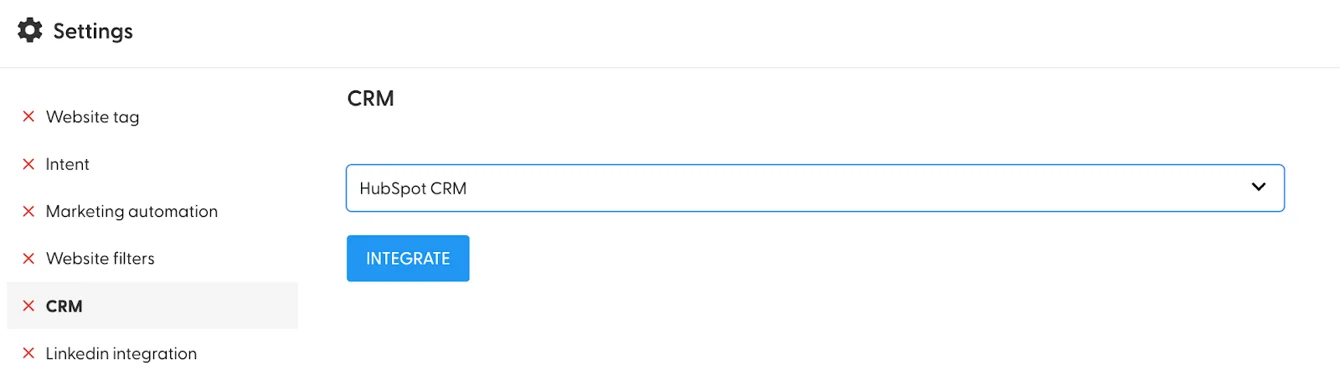
In N.Rich, go to Settings (cog icon) > CRM.
Select HubSpot CRM from the dropdown.
Click INTEGRATE.
Authorise the connection with your dedicated HubSpot user.
Choose your settings. See What does each CRM setting do?.
Click SAVE.
Permissions N.Rich requests
These are the permissions N.Rich requires, and the purpose and use of the associated data:
Permission scope | Usage |
Manage and view your CRM data | |
View details about property settings for companies. | Required to get the current structure of properties and fields, allowing N.Rich to align data and ensure compatibility with your HubSpot CRM. |
Create, delete, or make changes to property settings for companies. | Allows N.Rich to push data into your CRM, including the creation of custom fields when necessary, to support comprehensive account tracking. |
View details about users assigned to a CRM record. | Enables N.Rich to display the account owner on the N.Rich platform, providing visibility into account ownership within your CRM. |
View properties and other details about companies. | Required to access and display key company information on the N.Rich platform, facilitating correct account mapping between HubSpot and N.Rich. |
Create, delete, or make changes to companies. | Allows N.Rich to sync and update company data. Required for Account creation in HubSpot, if enabled. |
View details about contact lists. | Enables synchronisation of HubSpot lists to N.Rich segments. |
View properties and other details about deals. | Enables visibility into deals, supporting revenue tracking and helping correlate account engagement with deal progress. This is the foundation for opportunity analytics. |
View properties and other details about contacts. | Allows N.Rich to access contact-level information, providing insights into form fills or other sales engagements. |
Create timeline events | |
Grants access to manage custom activities on HubSpot CRM records. This includes creating or updating records. | Grants N.Rich permission to log engagement activities directly into HubSpot timelines. This enables a historical view of key interactions, helping sales and marketing teams understand account behaviour over time. |
Basic HubSpot account information | |
This includes your user email address and the account's primary domain. | Required to verify the integration and ensure that N.Rich data aligns with the correct HubSpot account, minimising discrepancies in account-level engagement tracking. |
Forms | |
This includes access to the Forms API. | Allows N.Rich to capture and process form submissions from your HubSpot instance, showing how form fills are influenced by marketing. |
Read one-to-one emails | |
Grants access to read one-to-one emails sent to contacts. | Enables N.Rich to analyse metrics related to one-to-one emails, such as opens and clicks. Required for the conversion metrics calculation. |
Properties and reconnecting
For the list of properties N.Rich creates on your HubSpot company records, and how to view them, see Which properties does N.Rich create in HubSpot?.
If your HubSpot authorisation expires, see How to fix HubSpot integration problems.
What's next
Need help? Reach out to your Solutions Engineer via the chat in the bottom-left corner of the N.Rich platform, by email or Slack.