Account Creation in Hubspot
Last updated: April 7, 2026
Pushing of accounts to Hubspot is possible, but only for the segments you define - and even then, you control whether this push happens automatically, manually or whether N.Rich should instead give you a list of accounts for you to upload to Hubspot.
Under Settings > CRM, you will see the following options:
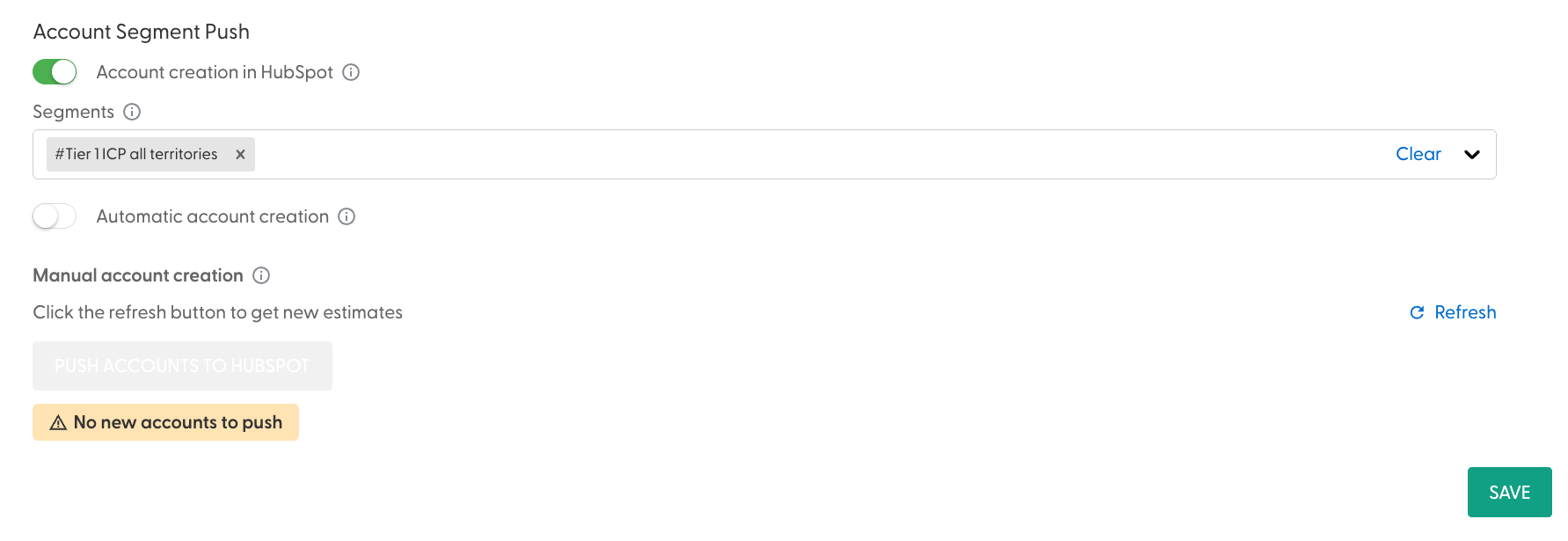
When you turn on the "Account creation in Hubspot" toggle, you will be presented with a list of all segments - here you get to select which segments qualify to have their accounts pushed to Hubspot.
The "Automatic account creation" toggle controls whether or not this happens automatically. If so, the process runs on autopilot alongside the daily syncs.
If not, you are presented with a "Refresh" button, which when clicked, checks the underlying segment for any accounts that exist in the segment but not in your Hubspot instance. If any are detected, the "Push accounts to Hubspot" button becomes available and beneath it, an option to download these accounts as an .xls file.
Pushing the "Push account to Hubspot" button will send these accounts to your connected Hubspot instance.
Any account created by N.Rich in your Hubspot instance will have a company property called “Is N.Rich Account” under the “N.Rich” category with its value set to “True”
N.Rich will never push an account with the same domain as an account existing in your CRM