Which properties does N.Rich create in HubSpot?
Last updated: October 9, 2026
N.Rich creates these properties on your HubSpot company records automatically the first time it pushes data, so no setup is needed. Use this list to find N.Rich data in HubSpot for reports, lists and workflows.
All N.Rich properties are created on the Company object only and their names start with nrich_. They update once the integration is active and there is intent or engagement data to push.
Intent properties
Intent properties come from your default intent report only. See How to create an intent report.
Type | Field name | Field label | Description |
Text | nrich_intent_report_name | Intent report name | Intent report name |
Number | nrich_composite_intent_score | Composite intent score | Composite account intent score (weighted third party and first party intent data based on intent report settings) |
Number | nrich_high_intent_contacts_num | High intent contacts | Number of contacts (cookies) with high intent score |
Number | nrich_high_intent_topics_num | High intent topics | Number of topics with > 60 as the intent score |
Text | nrich_intent_location_1 | Intent location 1 | Top location for intent |
Text | nrich_intent_location_2 | Intent location 2 | 2nd location for intent |
Text | nrich_intent_location_3 | Intent location 3 | 3rd location for intent |
Text | nrich_intent_topic_1 | Intent topic 1 | Highest scoring intent topic (available only if third party intent data is used in report and available for the account) |
Text | nrich_intent_topic_2 | Intent topic 2 | Second highest scoring intent topic (available only if third party intent data is used in report and available for the account) |
Text | nrich_intent_topic_3 | Intent topic 3 | Third highest scoring intent topic (available only if third party intent data is used in report and available for the account) |
Text | nrich_analytics_link | N.Rich analytics link | Permanent link to the N.Rich account analytics page of the account |
Text Area (Long) | nrich_intent_topics_list | All intent topics | Multiline text property that has all the topics separated by a newline |
Number | nrich_first_party_intent_score | First party intent score | Raw first party intent score from the selected intent report |
Number | nrich_third_party_intent_score | Third party intent score | Raw third party intent score from the selected intent report |
Text | nrich_first_party_intent_countries | First party intent countries | Lists the top 10 countries from where first-party engagements have originated, sorted by highest engagements first. |
Text | nrich_first_party_intent_locations | First party intent locations | Lists the top 10 locations, including city-level info where first-party engagements have originated, sorted by highest engagements first. |
Text | nrich_third_party_intent_countries | Third party intent countries | Lists the top 10 countries from where third-party intent signals have originated, sorted by highest intent first. |
Text | nrich_third_party_intent_locations | Third party intent locations | Lists the top 10 locations, including city-level info where third-party intent signals have originated, sorted by highest intent first. |
ABM and website engagement properties
Most engagement properties are aggregated to the time frame selected in ABM data aggregation time frame in your CRM settings.
Type | Field name | Field label | Description |
Date | nrich_last_engagement_date | Last ABM engagement date | Last date with one or more ABM engagements: video views, article readers or clicks |
Date | nrich_last_click_date | Last ABM click date | Last N.Rich click (and visit) date. Clicks are recorded using the N.Rich tag on the website, so every click also means a visit. |
Date | nrich_last_website_visit_date | Last website visit date | Last website visit date (any website visit, not just ABM) |
Number | nrich_engaged_contacts | Contacts with ABM engagement | Number of ABM engaged unique cookies from the account. Aggregated to the selected time frame. |
Number | nrich_clicked_contacts | Contacts with ABM clicks | Number of clicked unique cookies from the account. Aggregated to the selected time frame. |
Number | nrich_visited_contacts | Contacts with website visits | Number of visited unique cookies from the account from any channel. Aggregated to the selected time frame. |
Number | nrich_total_clicks | Total clicks | Total ABM clicks. Aggregated to the selected time frame. |
Number | nrich_total_video_views | Total video views | Total ABM video views. Aggregated to the selected time frame. |
Number | nrich_total_article_readers | Total article readers | Total ABM article readers. Aggregated to the selected time frame. |
Number | nrich_total_engagements | Total ABM engagement | Total ABM engagements. Aggregated to the selected time frame. |
Number | nrich_total_website_visits | Total website visits | Total website visits from any source. Aggregated to the selected time frame. |
Text Area (Long) | nrich_top_website_engagements | Top 5 website engagements | Multiline text property with top 5 URLs based on the number of page views |
Text Area (Long) | nrich_top_ad_engagements | Top 5 ad engagements | Multiline text property with top 5 ads based on the number of engagements |
Text Area (Long) | nrich_top_campaign_engagements | Top 5 campaign engagements | Multiline text property with top 5 campaigns based on the number of engagements |
Number | nrich_all_time_engagements | All time engagements | Total all time engagements, regardless of the selected time frame |
Number | nrich_all_time_engaged_contacts | All time engaged contacts | Total engaged cookies, regardless of the selected time frame |
Number | nrich_li_clicks_last_7_days | LinkedIn clicks last 7 days | Clicks from LinkedIn campaigns in the last 7 days |
Number | nrich_li_clicks_last_30_days | LinkedIn clicks last 30 days | Clicks from LinkedIn campaigns in the last 30 days |
Number | nrich_li_clicks_last_90_days | LinkedIn clicks last 90 days | Clicks from LinkedIn campaigns in the last 90 days |
ICP velocity properties
Type | Field name | Field label | Description |
Text | nrich_icp_sales_velocity_class | ICP sales velocity | Sales velocity has 3 possible values: High, Medium or Low. |
Number | nrich_icp_sales_velocity_score | ICP sales velocity score | A number in the range of 0-100 representing the sales velocity score. |
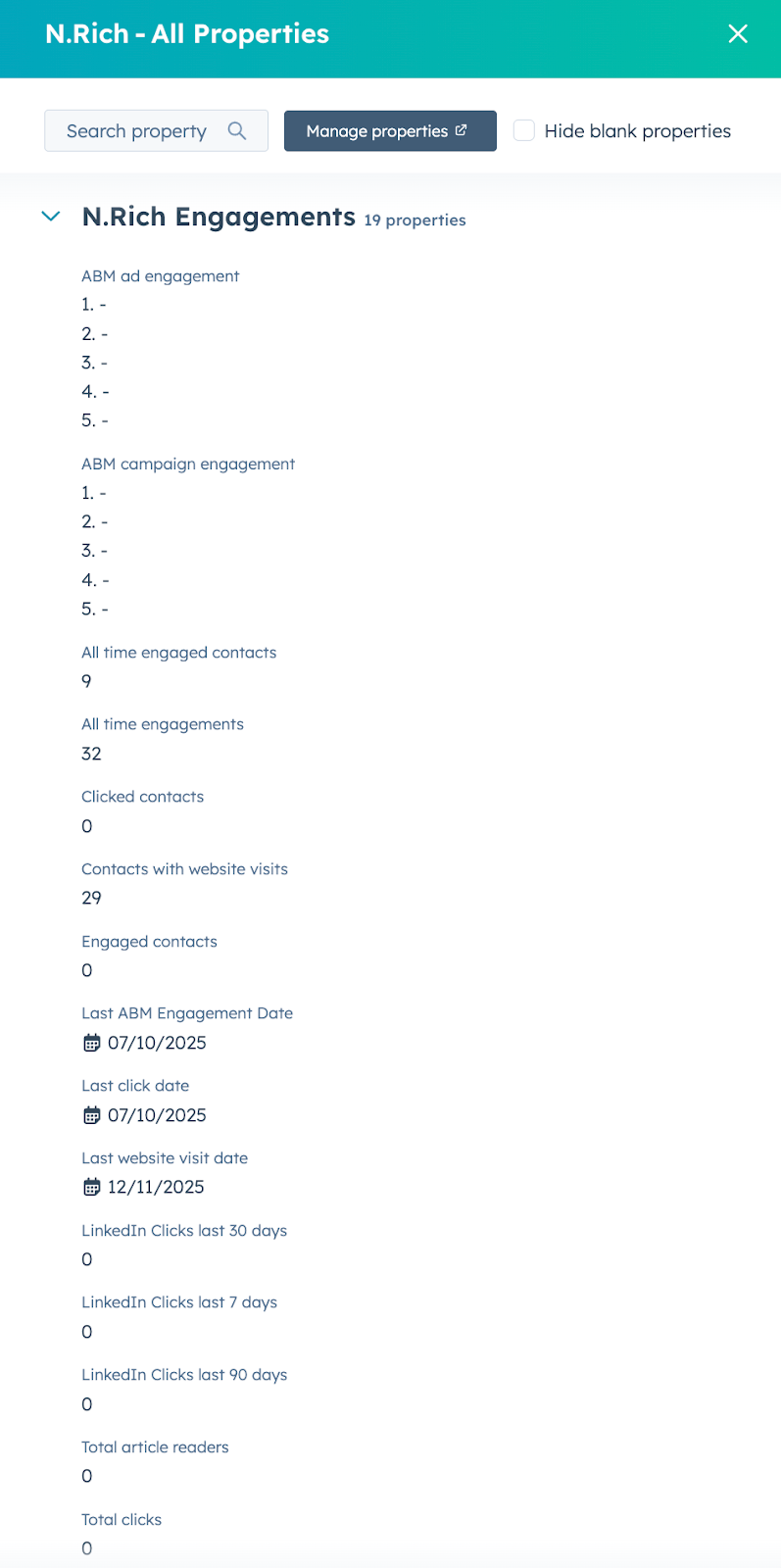
How to view N.Rich properties in HubSpot
Once a property is created, it becomes available on every company record.
In HubSpot, go to CRM > Companies.
Open any company record.
Look for the About this company section on the left-hand panel of the record.
Click View all properties, or Customize default properties to show N.Rich properties on the main record view.
What's next
Need help? Reach out to your Solutions Engineer via the chat in the bottom-left corner of the N.Rich platform, by email or Slack.