How to send engagement data to your CRM
Last updated: October 9, 2026
Push your accounts' engagement with your ABM ads and website to Salesforce or HubSpot, so your sales and marketing teams can see it in your CRM. This works for both Salesforce and HubSpot.
How to turn it on
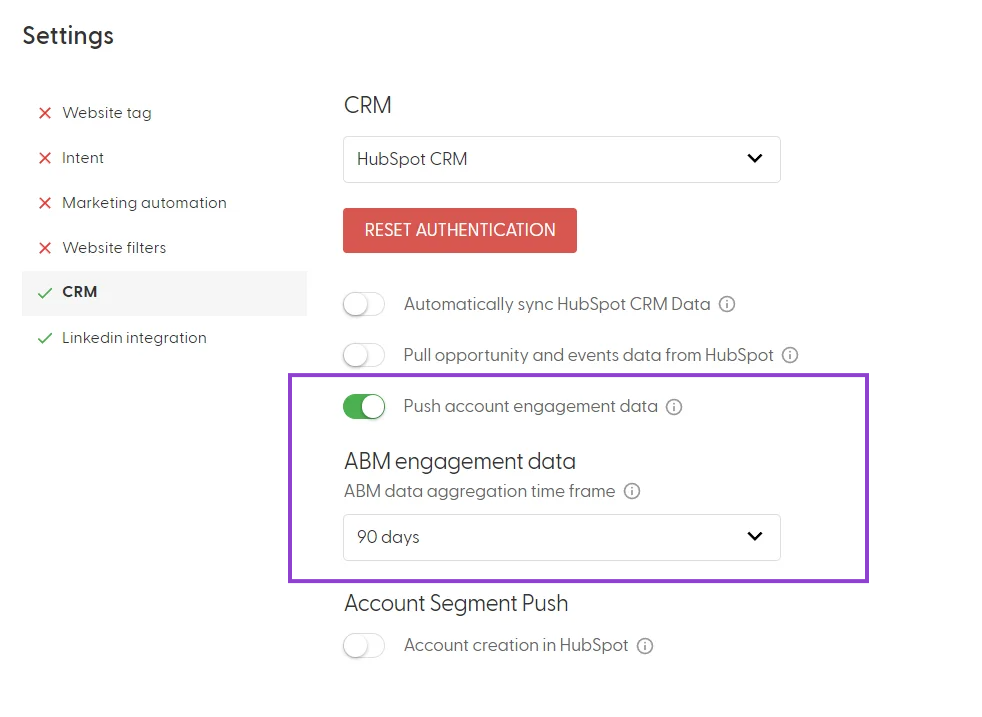
Go to Settings (cog icon) > CRM.
Turn on "Push account engagement data".
Under "ABM engagement data", choose the "ABM data aggregation time frame". We recommend 90 days.
Click SAVE.
What gets sent
Salesforce: engagement data is written to the N.Rich account fields you create in Salesforce. N.Rich does not create these fields, so they must exist before you turn on the push. See Which Salesforce fields and objects do I need to create?
HubSpot: engagement data is written to company properties that N.Rich creates automatically the first time it pushes data. See Which properties does N.Rich create in HubSpot?
How often it's sent
Engagement data is pushed twice daily. For all sync timings, see How often does Salesforce sync with N.Rich? and How often does HubSpot sync with N.Rich?
How the time frame works
The time frame sets which engagement is considered relevant. Engagement older than the selected time frame is removed from your CRM. For example, if you select 90 days and the last engagement happened 91 days ago, it is removed from your CRM.
What's next
Need help? Reach out to your Solutions Engineer via the chat in the bottom-left corner of the N.Rich platform, by email or Slack.