Which Salesforce fields and objects do I need to create?
Last updated: October 9, 2026
N.Rich does not create fields in Salesforce, so you need to create them manually before N.Rich can push data to your accounts. Use this reference when you set up the Salesforce integration or the segment push.
Field groups
We recommend grouping the N.Rich fields into five groups:
Intent data
ABM engagements
Web engagements
ICP velocity metrics
LinkedIn campaigns engagement
Fields
Set up the field names and data types in Salesforce exactly as listed in the tables below. Otherwise the sync will fail.
Intent data
Field name | Field label | Description | Salesforce data type |
nrich_IntentReportName | Intent report name | Intent report name. | Text (255 chars) |
nrich_CompositeIntentScore | Composite intent score | Composite account intent score (weighted third party and first party intent data based on intent report settings). | Number |
nrich_FirstPartyIntentScore | First party account intent score | Raw first party intent score from the selected intent report. | Number |
nrich_ThirdPartyIntentScore | Third party intent score | Raw third party intent score from the selected intent report. | Number |
nrich_HighIntentTopicsNum | High intent topics | Number of topics with an intent score above 60. | Number |
nrich_IntentTopicsList | All intent topics | Multiline text property with all topics separated by a new line. Use a "Long Text Area" field type so the data syncs without being truncated. | Long Text Area |
nrich_IntentLocation_1 | Intent location 1 | Top location for intent. | Text (255 chars) |
nrich_IntentLocation_2 | Intent location 2 | 2nd location for intent. | Text (255 chars) |
nrich_IntentLocation_3 | Intent location 3 | 3rd location for intent. | Text (255 chars) |
nrich_IntentTopic_1 | Intent topic 1 | Highest scoring intent topic (available only if third party intent data is used in the report and available for the account). | Text (255 chars) |
nrich_IntentTopic_2 | Intent topic 2 | Second highest scoring intent topic (available only if third party intent data is used in the report and available for the account). | Text (255 chars) |
nrich_IntentTopic_3 | Intent topic 3 | Third highest scoring intent topic (available only if third party intent data is used in the report and available for the account). | Text (255 chars) |
nrich_AnalyticsLink | N.Rich analytics link | Permanent link to the N.Rich account analytics page of the account. | Text (255 chars) |
ABM engagements
Field name | Field label | Description | Salesforce data type |
nrich_LastEngagementDate | Last ABM engagement date | Last date with one or more ABM engagements: video views, article readers or clicks. | Date |
nrich_LastClickDate | Last ABM click date | Last N.Rich click (and visit) date. Clicks are recorded using the N.Rich tag on the website, so every click also means a visit. | Date |
nrich_LastWebsiteVisitDate | Last website visit date | Last website visit date (any website visit, not just ABM). | Date |
nrich_EngagedContacts | Contacts with ABM engagement | Number of ABM engaged unique cookies from the account. Aggregated to the time frame the user has selected. | Number |
nrich_AllTimeEngagedContacts | All time engaged cookies disregarding the selected time range | Number of ABM engaged unique cookies from the account. Aggregated for all time. | Number |
nrich_ClickedContacts | Contacts with ABM clicks | Number of clicked unique cookies from the account. Aggregated to the time frame the user has selected. | Number |
nrich_VisitedContacts | Contacts with website visits | Number of visited unique cookies from the account from any channel. Aggregated to the time frame the user has selected. | Number |
nrich_TotalClicks | Total clicks | Total ABM clicks. Aggregated to the time frame the user has selected. | Number |
nrich_TotalVideoViews | Total video views | Total ABM video views. Aggregated to the time frame the user has selected. | Number |
nrich_TotalArticleReaders | Total article readers | Total ABM article readers. Aggregated to the time frame the user has selected. | Number |
nrich_TotalEngagements | Total ABM engagement | Total ABM engagements. Aggregated to the time frame the user has selected. | Number |
nrich_AllTimeTotalEngagements | All time ABM engagement | Number of total ABM engagements. Aggregated for all time. | Number |
Web engagements
Field name | Field label | Description | Salesforce data type |
nrich_TotalWebsiteVisits | Total website visits | Total website visits from any source. Aggregated to the time frame the user has selected. | Number |
nrich_TopWebsiteEngagements | Top 5 website engagements | Multiline text property with the top 5 URLs based on the number of page views. Use a "Long Text Area" field type so the data syncs without being truncated. | Long Text Area |
nrich_TopAdEngagements | Top 5 ad engagements | Multiline text property with the top 5 ads based on the number of engagements. Use a "Long Text Area" field type so the data syncs without being truncated. | Long Text Area |
nrich_TopCampaignEngagements | Top 5 campaign engagements | Multiline text property with the top 5 campaigns based on the number of engagements. Use a "Long Text Area" field type so the data syncs without being truncated. | Long Text Area |
ICP velocity metrics
Field name | Field label | Description | Salesforce data type |
nrich_IcpSalesVelocityClass | ICP sales velocity | Sales velocity has 3 possible values: High, Medium or Low. | Text (255 chars) |
nrich_IcpSalesVelocityScore | ICP sales velocity score | A number from 0 to 100 representing the sales velocity score. | Number |
LinkedIn campaigns engagement
Field name | Field label | Description | Salesforce data type |
nrich_LinkedinClicksLast7Days | LinkedIn Clicks for last 7 days | Clicks from LinkedIn campaigns. Aggregated to the last 7 days. | Number |
nrich_LinkedinClicksLast30Days | LinkedIn Clicks for last 30 days | Clicks from LinkedIn campaigns. Aggregated to the last 30 days. | Number |
nrich_LinkedinClicksLast90Days | LinkedIn Clicks for last 90 days | Clicks from LinkedIn campaigns. Aggregated to the last 90 days. | Number |
Segments object
To see which N.Rich segments an account belongs to in Salesforce, also set up a custom object.
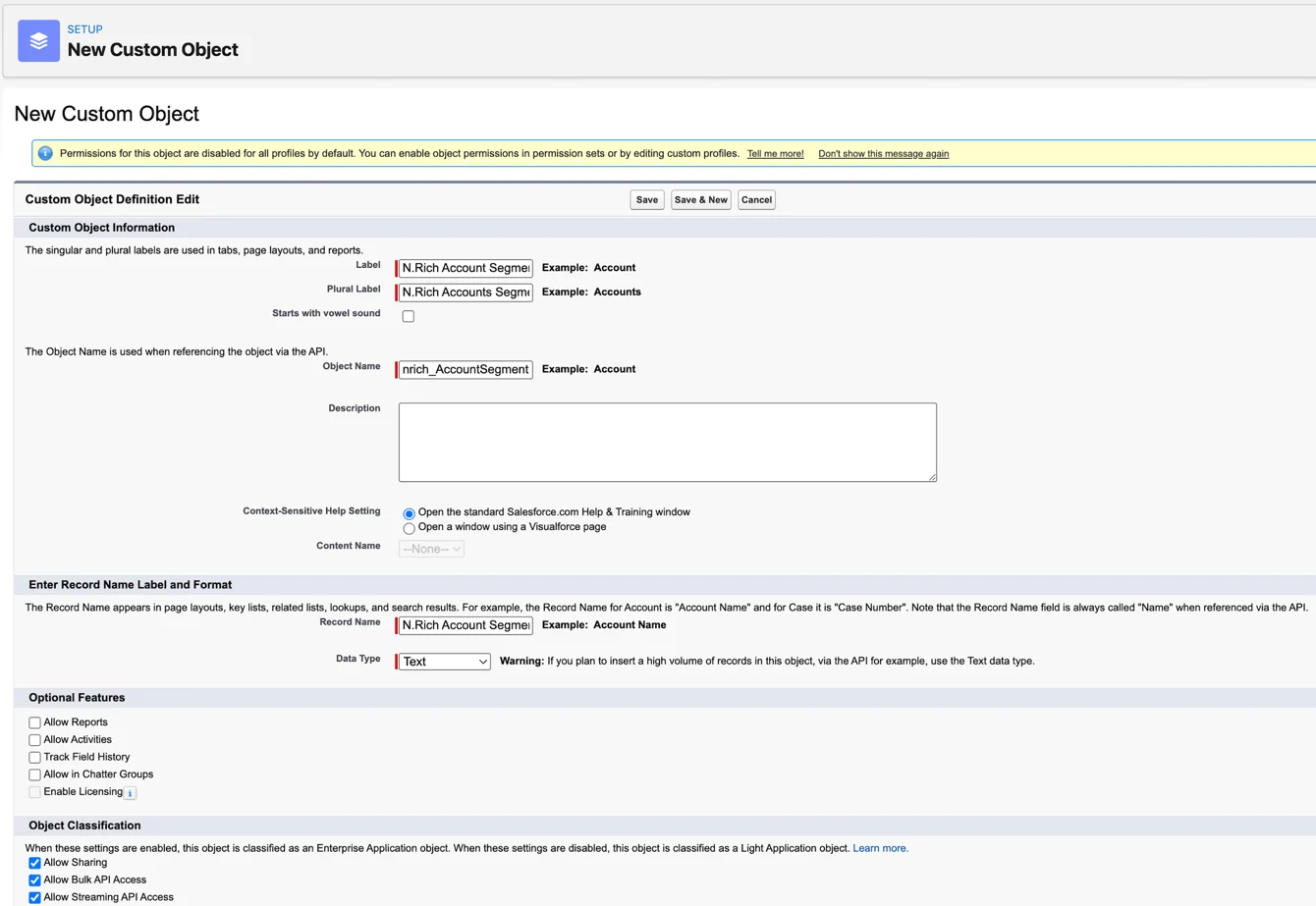
Create a custom object with the following settings:
Label = N.Rich Account Segment (you can pick any name that works for your team)
Plural Label = N.Rich Accounts Segments (you can pick any name that works for your team)
API name = nrich_AccountSegment__c
Then create these fields on the new custom object:
Field label | API name | Type | Length |
Account | Account__c | Lookup (Account) | Not applicable |
N.Rich Association ID* | nrich_AssociationId__c | Text | 255 |
N.Rich Segment ID | nrich_SegmentId__c | Text | 255 |
N.Rich Segment Name | nrich_SegmentName__c | Text | 255 |
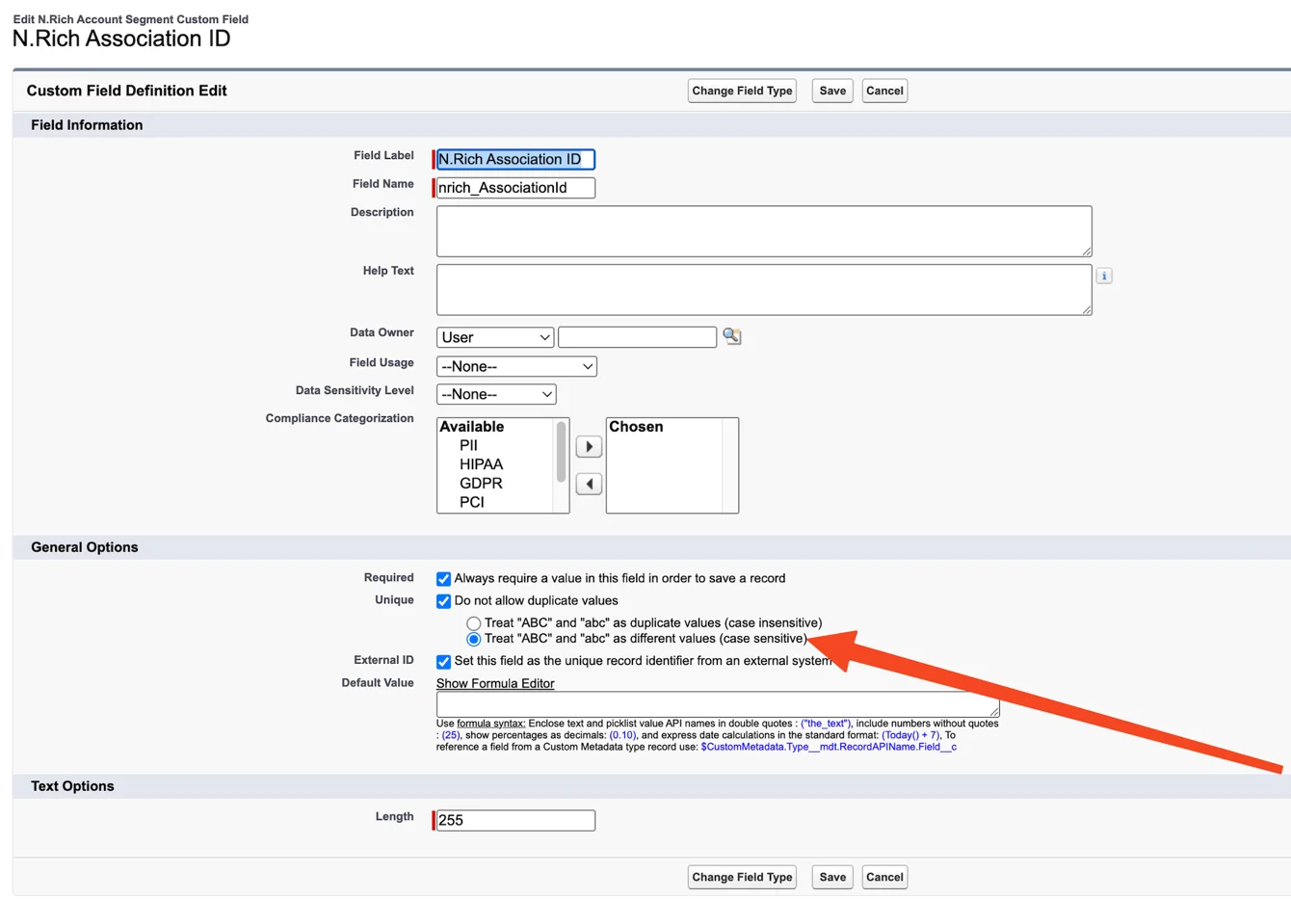
*For the N.Rich Association ID field, make sure duplicates are handled in a case sensitive way:
"Do not allow duplicate values" is checked.
"Treat "ABC" and "abc" as different values (case sensitive)" is selected (see the image below).
The External ID checkbox is checked.
What's next
Need help? Reach out to your Solutions Engineer via the chat in the bottom-left corner of the N.Rich platform, by email or Slack.