Website Analytics
Last updated: May 4, 2026
The Website Analytics dashboard presents the data collected by the N.Rich Website Tag, giving you a comprehensive view of the traffic hitting your website at the account level.
Prerequisite: The N.Rich Website Tag must be installed on your website. Without it, no website traffic data will be collected. Learn how to install the Website Tag here.
Global controls (top of dashboard)
Internal traffic toggle By default, internal traffic is excluded. You can switch between three modes:
Exclude internal traffic (default): Hides visits originating from IP addresses associated with your internal domains
Include internal traffic: Shows all traffic, internal and external combined
Show only internal traffic: Isolates visits from your own team
Internal domains are configured under Settings. Any traffic from IP addresses associated with those domains is classified as internal.
Date range picker: Select any start and end date. You can toggle the granularity between Daily, Weekly, and Monthly views. Wider date ranges rely on more data and may be slower to load.
Filters : You can filter between Segments and All available website data.
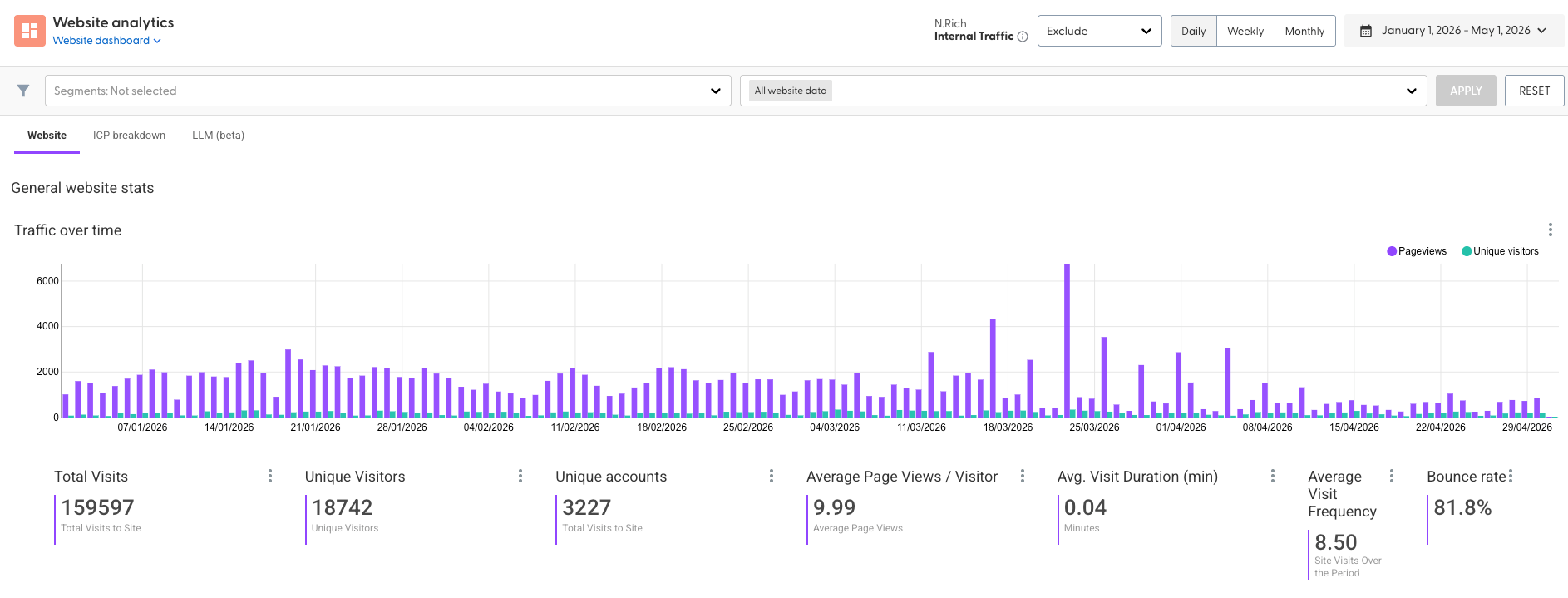
General website stats
Traffic over time
This graph shows data and graph between your total PageViews and Unique visitors at the time period you selected with details about your visitors, how long they stayed on the website and their bounce rate.
Top Engaged Accounts
A ranked list of your target accounts, ordered by engagement across your website and campaigns. Spot your hottest accounts at a glance, with full visibility into Account CRM ID, Account Name, visits, cookies, sessions, and supporting engagement data.
Website engagement stream
A chronological, real-time feed of target accounts visiting your website - showing when they visited, the pages they viewed, session duration, and the UTM campaign that brought them in.
Top referring pages:
It shows which external pages/sources are sending your target accounts to your website - i.e. where your visitors are coming from before they land on your site.
Top-250 page breakdown:
A ranked list of your top 250 most visited pages by your target accounts - showing which pages on your website are getting the most attention from your ICP.
Organic Channel Visits
Shows you website visits from target accounts that came organically - i.e. without clicking on a paid N.Rich ad or campaign. These are visitors who found you through their own research.
Paid Channel Visits:
Shows you website visits from target accounts that came via paid channels - i.e. accounts that clicked through to your website as a result of a paid touchpoint.
Organic Channel Avg. Session Duration (s)
The average amount of time (in seconds) that visitors from organic channels spend on your website per session.
Paid Channel Avg. Session Duration (s)
The average amount of time (in seconds) that visitors arriving via paid channels spend on your website per session.
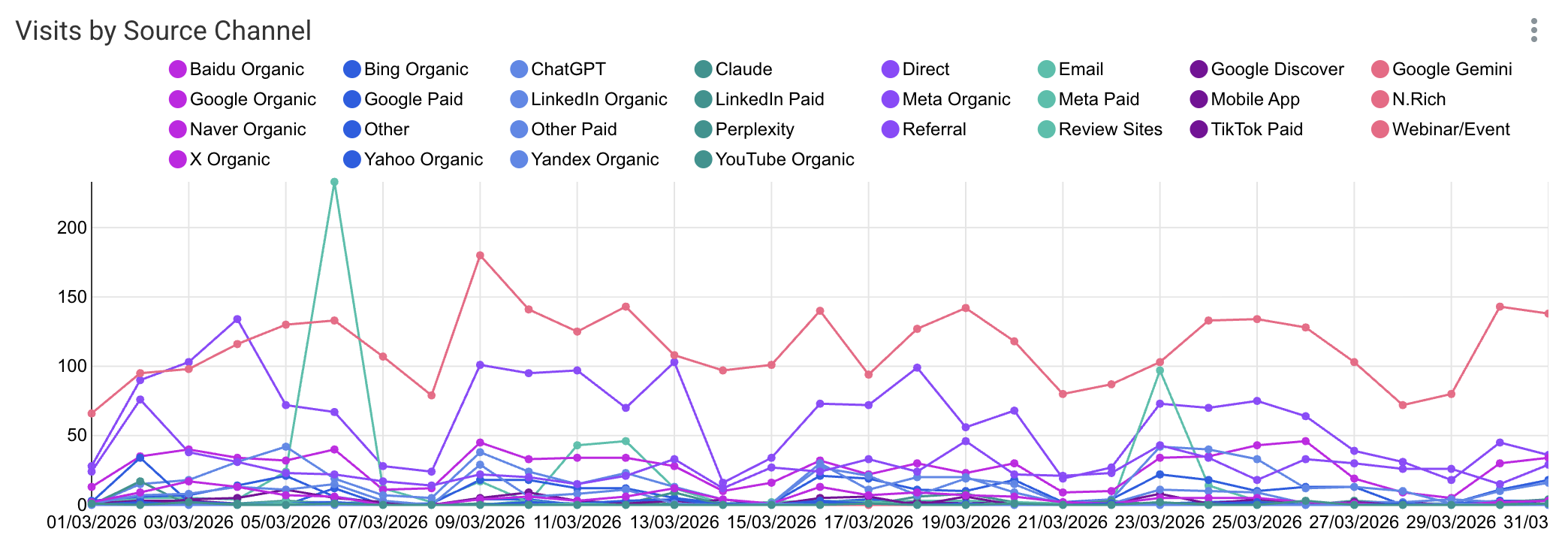
Visits by Source Channel
A breakdown of all website visits from your target accounts grouped by which channel drove them - giving you a side-by-side view of all traffic sources in one place.
Visits by Device Type
A breakdown of website visits from your target accounts grouped by the device they used to visit your site.
PageViews by Paid Channel
A breakdown of total page views generated by target accounts grouped by each paid channel that drove them to your site.
Geographic breakdown
Visits by Geo
A breakdown of website visits from your target accounts grouped by geographic location of the visitor.
Total visits by location
The aggregate total of all website visits grouped by location - combining both target account (known) AND unknown visitor traffic by geography.
ICP Breakdown
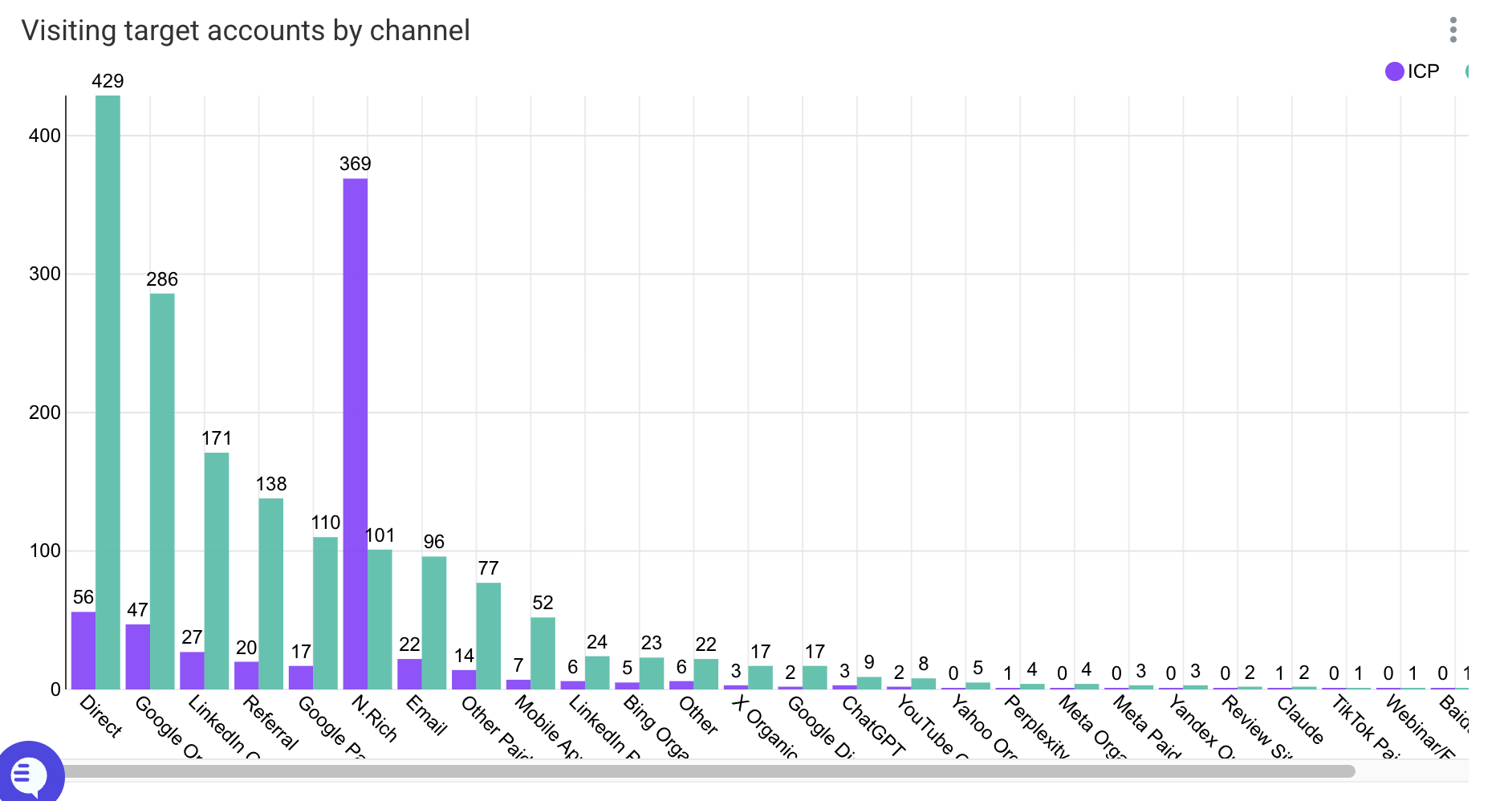
Visiting target accounts by channel
A breakdown of which target accounts from your ICP are visiting your website, grouped by the channel that brought them there - combining account identity with channel attribution in one view.
Total visiting target accounts
The number of unique target accounts from your segment that visited your website during the selected time period, with a breakdown comparing ICP and Non-ICP account visits.
Target account visits by channel
See which channels are bringing your target accounts to your site. Each row represents one account-channel pairing, so the same account can appear multiple times if it visited via more than one channel. The table shows the account's CRM Name (clickable to open the CRM record), Industry, Company Size, Country, total Website Visits, and Unique Visitors.
LLM (beta)
The total number of visits (not unique accounts) from your target accounts broken down by which channel drove each visit.
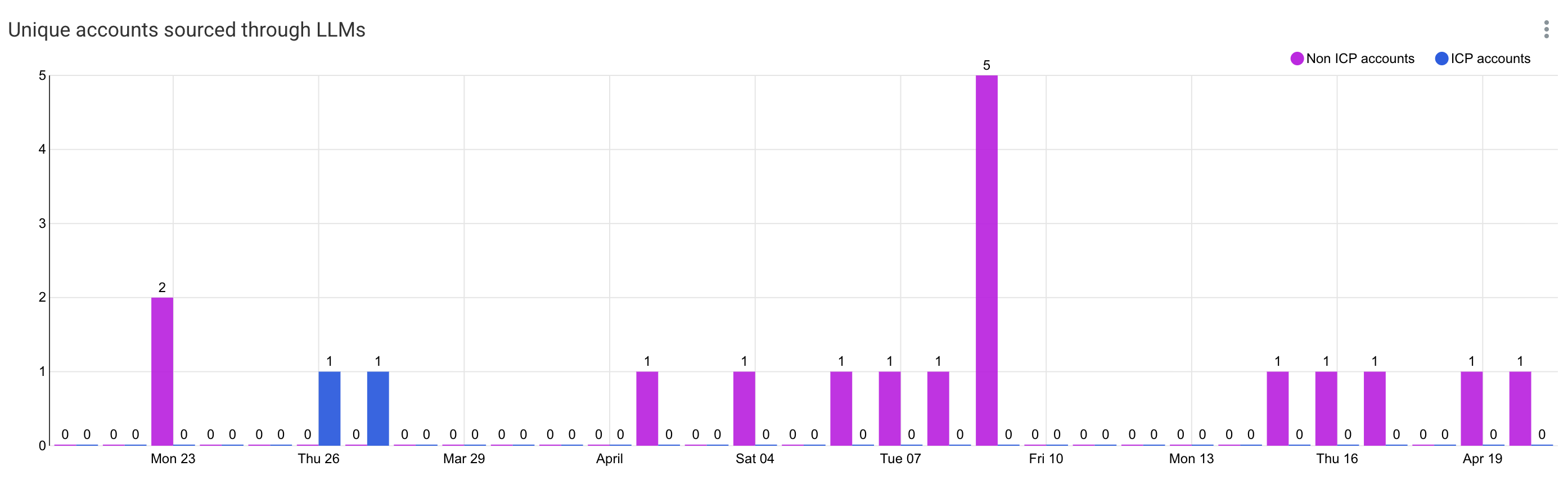
Unique accounts sourced through LLMs
A new/emerging metric that tracks which target accounts arrived at your website via Large Language Model (LLM) referrals - i.e. visitors who came from AI tools like ChatGPT, Perplexity, Claude, Gemini etc. that recommended or linked to your website.
Top LLMs by account reach
This section tracks website visits that came from Large Language Models (LLMs) - i.e. AI tools like ChatGPT, Perplexity, Claude, Gemini etc. referring traffic to your website.
Top LLMs by Account Reach - what it shows:
Which AI tools are sending target accounts to your website
How many unique target accounts arrived via each LLM
Ranked list of LLMs by how many ICP accounts they drove to your site
Share of LLM target account visitors
The percentage of your total website visitors (from target accounts) that arrived via an LLM/AI tool referral.
What it shows:
LLM share → out of all target account visits, what % came via AI tools
Trend → is that share growing over time
Relative importance of LLM as a channel vs. organ