How do LinkedIn ad clicks show up in N.Rich analytics?
Last updated: October 9, 2026
When LinkedIn is connected, N.Rich brings in clicks from your LinkedIn ad campaigns and shows them at account level, next to your N.Rich ads, CRM activity and website visits.
Where you see LinkedIn clicks
Open an account's dashboard. LinkedIn clicks appear as a total on the Overview and in the Total engagements chart.
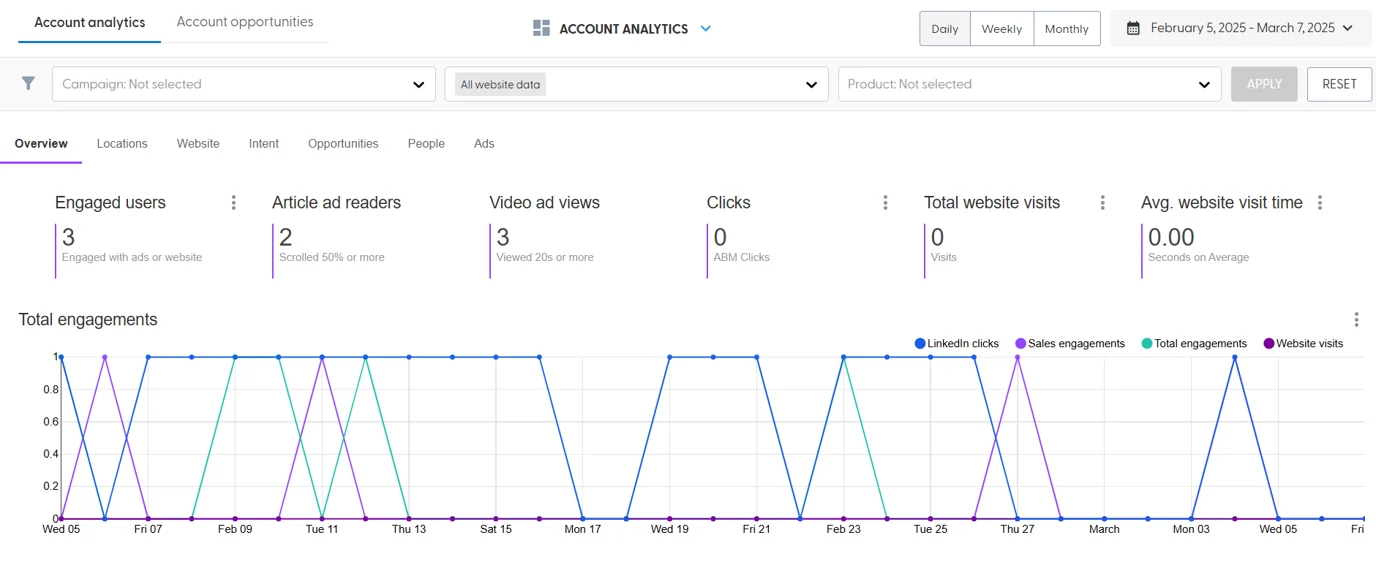
LinkedIn clicks are counted per account. They don't appear as individual entries in the engagement or activity streams.
What you need
LinkedIn connected to N.Rich, with a primary LinkedIn Ads account selected. Clicks are only collected from that primary account. See How to connect LinkedIn to N.Rich.
LinkedIn campaigns with activity, so there are clicks to bring in.
The accounts must be in at least one of your N.Rich segments and have a LinkedIn company URL.
Why the numbers can be lower than in LinkedIn
LinkedIn only shares approximate, company-level click data and hides very small numbers for privacy. Treat the LinkedIn clicks you see in N.Rich as a minimum: an account may have clicked more than shown, and an account that clicked may show zero.
If you don't see any LinkedIn clicks
Check that the account is in a segment and has a LinkedIn company URL.
Check that the right primary LinkedIn Ads account is selected.
Ask your Solutions Engineer to check whether your LinkedIn connection needs to be re-authorized.
What's next
Need help? Reach out to your Solutions Engineer via the chat in the bottom-left corner of the N.Rich platform, by email or Slack.