What do CRM stages mean?
Last updated: October 9, 2026
CRM stages show where each account stands in your sales pipeline, based on its opportunities in your CRM. Use this table to understand what each stage means.
CRM stages
CRM stage | Definition |
New prospect | There are no won opportunities for the account and it's not found in your CRM yet |
In CRM | Account that is in your CRM, but has no won opportunities, no open opportunities and no lost opportunities during the past 6 months |
Pipeline | Account that has at least one open opportunity, but no won opportunities |
Client | Account with at least one won opportunity |
Client pipeline | Account that has at least one won opportunity and at least one open opportunity |
Recently lost | Account that has a lost opportunity during the past 6 months, but no won opportunities |
What you need
An active CRM integration.
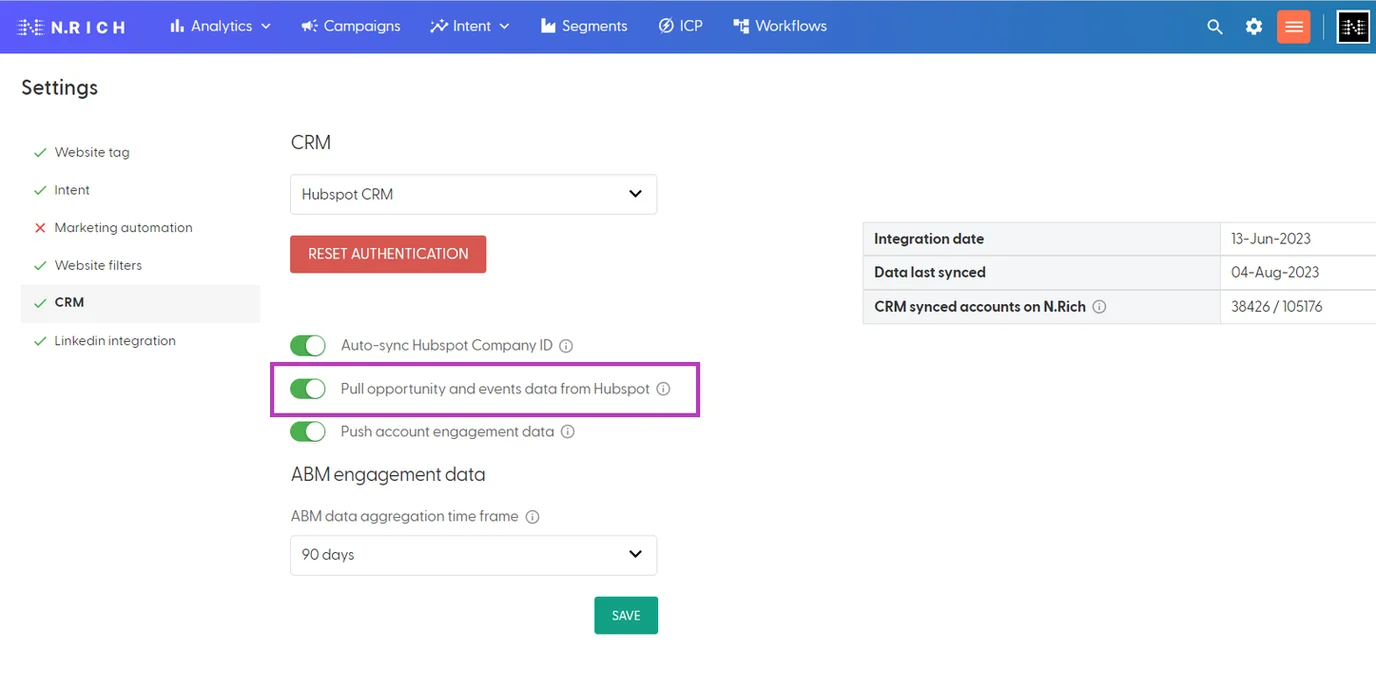
To see opportunity-based stages, turn on "Pull opportunity data from CRM to N.Rich" (Salesforce) or "Pull opportunity and events data from HubSpot" (HubSpot) in Settings (cog icon) > CRM. See What does each CRM setting do?
Why do I see a dash?
If no CRM is connected to your N.Rich account, the CRM stage shows a dash (-). The tooltip on the dash points you to Setup, where you can connect your CRM.
How often stages update
CRM stages update after your CRM data syncs to N.Rich. For sync timings, see How often does Salesforce sync with N.Rich? and How often does HubSpot sync with N.Rich?
Grouped accounts
For an account that has other accounts grouped within it, the CRM stage is evaluated based on the entire group of accounts and their opportunities. It shows the stage of the opportunity that is furthest down the sales pipeline, whether that opportunity belongs to the parent account or to a grouped account.
What's next
Need help? Reach out to your Solutions Engineer via the chat in the bottom-left corner of the N.Rich platform, by email or Slack.